
Changing an island freezer from one frozen-food assortment to another involves more than moving cartons. Existing stock needs a disposition, baskets and dividers may be repositioned, the empty cabinet needs a defined cleaning and inspection release, labels and product zones need revision, and the next shift needs to know what was approved. A written changeover protects product identity and store workflow while leaving technical refrigeration decisions to qualified personnel and model documentation.
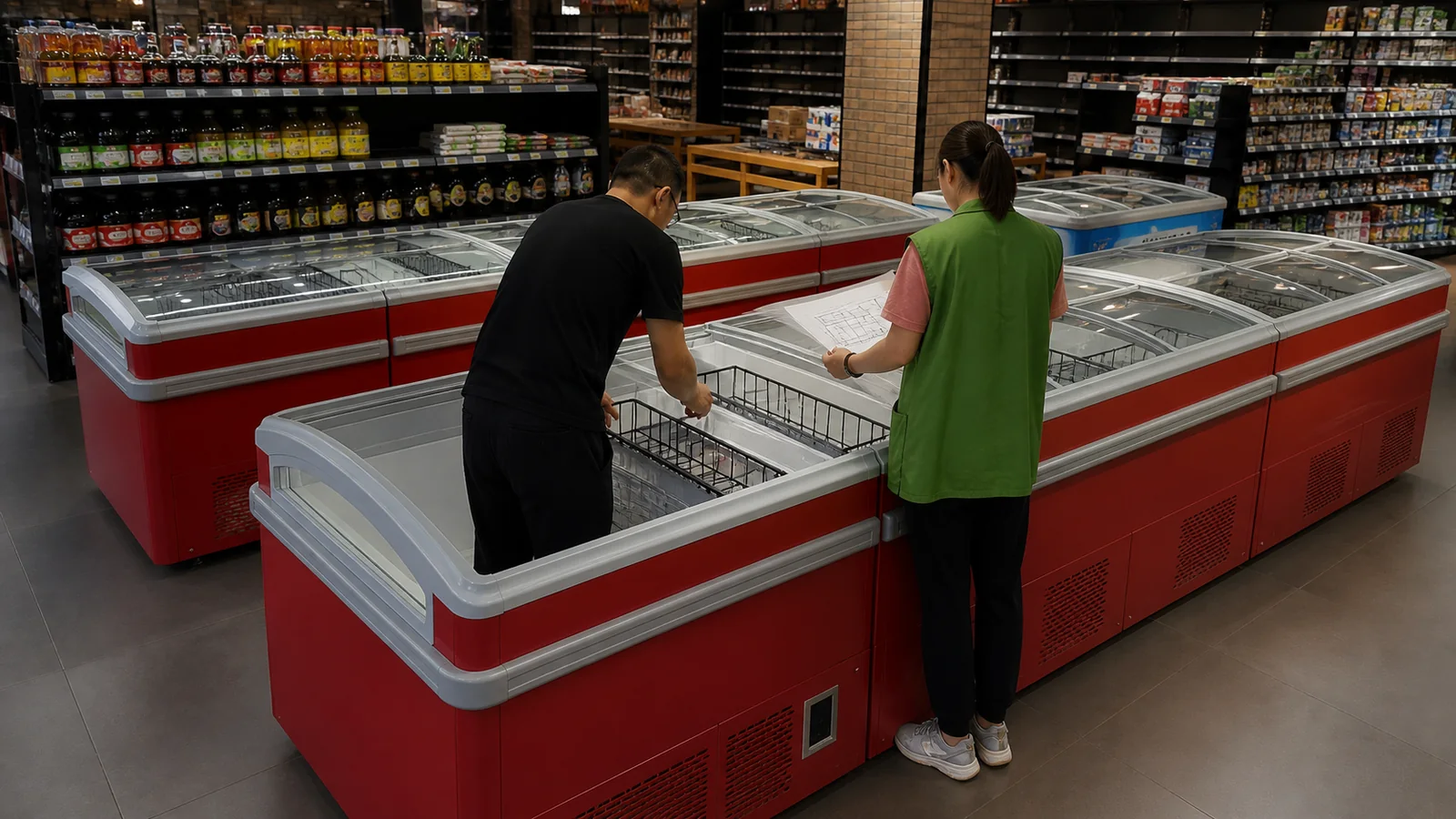
Freeze the Scope Before Removing Stock
Identify store, commercial island freezer asset, cabinet modules, left/right orientation, sliding-lid sections, current product map, target product categories, changeover owner, schedule, and where stock will move. This article concerns a low horizontal island cabinet with covered sliding glass access; it is not an open chiller or chest freezer.
Photograph the approved before-state and note any existing exception: damaged basket, lid obstruction, frost or moisture observation, unreadable label, or stock outside its zone. Never hide an existing problem inside the changeover.
Remove and Account for Existing Product
Use the store's approved product-handling and food-safety procedures. Record quantities or inventory status at the level required by the operation, along with destination: another approved cabinet, sale disposition, hold, return, or waste route. Never leave unidentified cartons beside the freezer while baskets are moved.
Assign responsibility for price labels, shelf strips, promotions, and digital inventory. The physical and system change should refer to the same product-zone map.
Release the Empty Cabinet for Reset
After stock removal, the responsible team should clean and inspect accessible interior surfaces, baskets, dividers, lid tracks, handles, and visible condition according to model and store guidance. Never chip ice, remove technical panels, or use unapproved chemicals or tools. Any electrical, refrigeration, seal, lid, or structural concern should go to qualified service.
Record a clean-and-empty release before new stock enters. If an exception remains open, state whether refill is paused or limited under the store's procedure.
Reset Baskets and Product Zones From a Map
Use a dated plan showing cabinet section, basket or divider position, product category, facing direction, label location, and any reserved space. Keep sliding-lid travel and handles unobstructed. Never fill above model or store limits; use the selected equipment documentation rather than inventing a generic line.
Photograph the empty basket layout from consistent positions. If physical baskets differ from the approved map, stop and record the variance instead of forcing a layout.
| Changeover Stage | Release Evidence | Next Owner |
|---|---|---|
| Before state | Asset ID, stock map, photos, exceptions | Stock-removal team |
| Empty cabinet | Product disposition and empty view | Cleaning/inspection owner |
| Reset complete | Basket and divider map, lid path check | Refill team |
| Refill complete | Product-zone photos, labels, exceptions | Store handover owner |
Refill in a Controlled Sequence
Load by zone so the map remains visible and errors are caught early. Confirm product identity, packaging condition, label position, and access. Keep unrelated cartons and old labels away from the working area. Where product handling or temperature exposure matters, follow the store's validated process rather than relying on a generic article.
After a partial fill, check that lids travel across their full normal path and that stock does not interfere with tracks or handles. Continue only when the arrangement matches the approved map.
Hand the New State to Store Operations
The final record should show asset, date, old and new product maps, product disposition, cleaning release, basket reset, refill photos, label update, lid travel observation, open exceptions, and responsible acceptance. Give the next shift a short operating note rather than expecting them to reconstruct the change from photos.
Review the layout after initial store use. Record unauthorized basket moves, product overflow, lid obstruction, or recurring confusion as process feedback for the next changeover.
Plan the Changeover as a Timed Store Event
Assign a changeover window that accounts for product removal, approved holding or relocation, empty-cabinet release, basket reset, refill, label updates, system records, and final handoff. Build a sequence with dependencies rather than giving every team the same start time. The basket team cannot verify an empty layout while old product remains, and the refill team should not begin before the responsible cleaning and inspection release.
Name a decision owner at each gate. Stock discrepancies go to inventory control, product-condition questions follow the store's food process, damaged baskets go to the equipment or supplier route, and technical cabinet observations go to qualified service. Clear ownership prevents floor staff from solving an equipment exception by changing the product map or hiding a broken divider under stock.
Prepare a contingency for incomplete work. Identify approved temporary product locations, the latest time for a go/no-go decision, sections that can remain closed, and who updates labels and digital records. The contingency must follow store procedures and actual equipment suitability; it is not permission to place frozen goods in a beverage cooler or another mismatched cabinet.
Conduct a short post-event review using timestamps and exceptions. Compare planned and actual duration by stage, products that failed to fit, basket or divider conflicts, lid-path issues, label errors, and handoff gaps. Update the next changeover plan without silently modifying technical equipment requirements. A repeatable event plan reduces rushed decisions and gives store managers evidence for staffing, assortment, and layout improvements.
Preserve Traceability When Several Cabinets Change Together
For a store-wide reset, assign each island and module a changeover ID. Stock destination, empty release, basket map, refill map, photos, and exceptions must retain that ID. Avoid one folder labelled freezer reset for several cabinets because a basket or product discrepancy cannot be located later. Use a master dashboard for progress and cabinet-level sheets for evidence. If one island is delayed, the others can reach handoff without hiding the incomplete asset. This approach also helps the next seasonal change reuse lessons while keeping every selected island-freezer structure and model distinct.
Control Labels and Digital Product Locations
Physical basket maps and store systems should change under the same event ID. List old and new product zones, shelf or basket labels, price communication, inventory location, promotion, and effective time. Assign an owner for each update and verify a sample after refill. If digital and physical locations disagree, mark the section as an exception rather than asking staff to remember the intended map. This avoids customer and replenishment confusion after the team has completed the physical reset.
Buyer Checklist
- Identify the exact covered island-freezer asset and sections.
- Approve the old and target product-zone maps before removal.
- Account for all existing stock through an approved destination.
- Obtain a clean-and-empty release before basket reset.
- Reset baskets and dividers from a dated map while preserving lid travel.
- Refill by zone and verify labels, product identity, and access.
- Hand over the final state, exceptions, and next-shift responsibilities.
Frequently Asked Questions
Can baskets be moved while the freezer remains full?
A controlled empty or staged process makes basket identity, cleaning, and the approved reset easier to verify; follow the store and model procedure.
Can an open-chiller shelf map be reused?
No. A covered horizontal island freezer has different access, baskets, lids, and product presentation.
Who handles technical concerns found while empty?
Qualified service personnel should handle electrical, refrigeration, structural, lid, or seal issues under the selected model documentation.
Related Product or Reading
Use island freezer loading-line and basket layout when designing the baseline product map that this changeover must preserve.
Discuss the Exact Project
Send XCCOLD the selected island-freezer model, cabinet configuration, basket needs, product categories, store plan, lid access, and project-specific documentation questions.