
A covered island freezer often sits inside a circulation area rather than against a wall. Shoppers may approach from several sides, sliding lid sections may move in different directions, and staff may arrive with a cart that is longer or wider than the space left on the plan. Without a defined replenishment side and sequence, carts can block intersections, open lids can conflict with work, and basket zones can be refilled inconsistently. Planning should connect store geometry, exact cabinet structure, lid sections, basket map, cart size, staff route, timing and handoff.
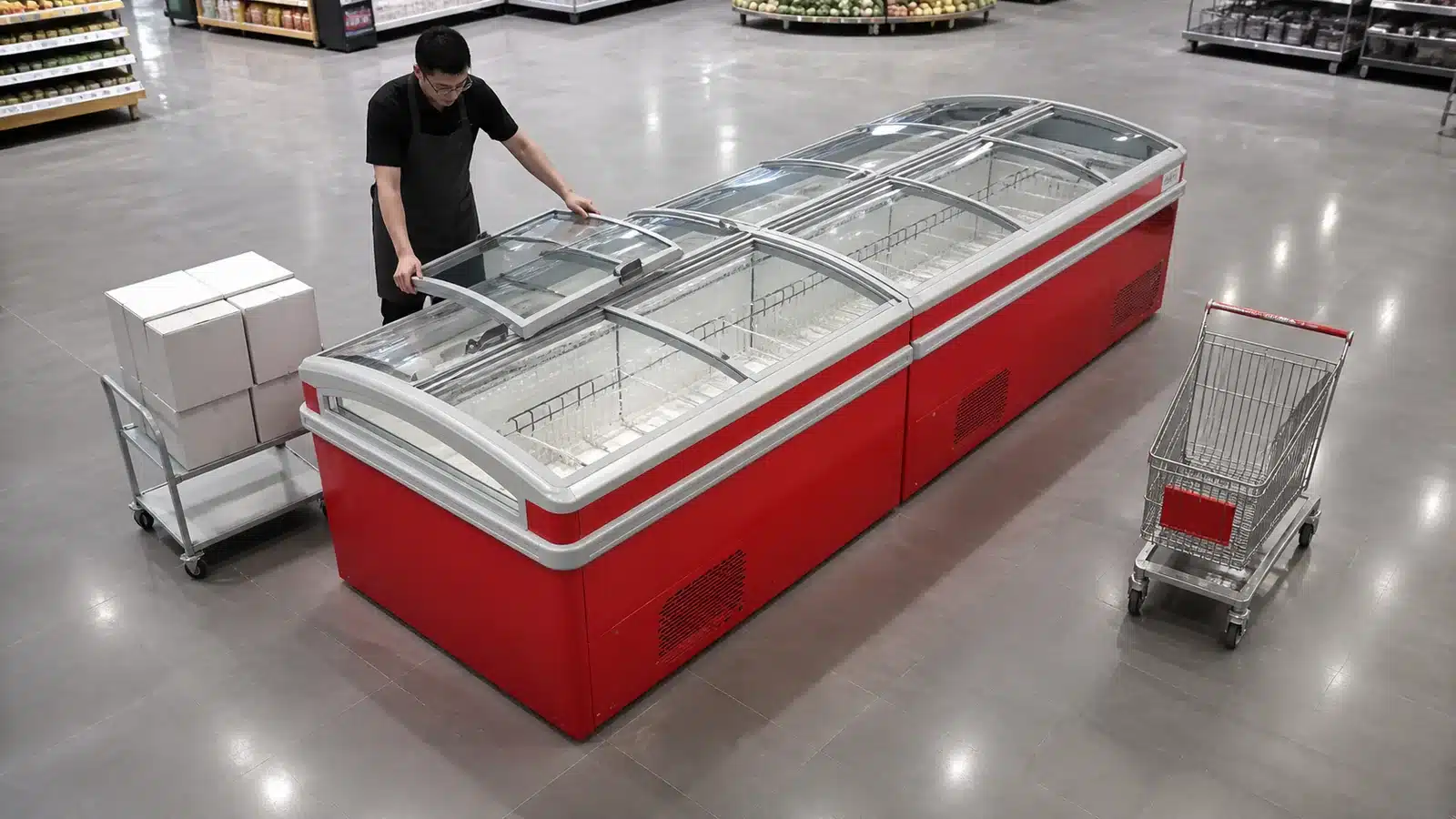
Map the Exact Island Structure
Use the selected commercial island freezer drawing and installed asset IDs. Record each cabinet module, end, sliding glass lid section, opening direction, basket or product zone and any combined-island joint. Never use a generic chest-freezer symbol.
Confirm whether the project is plug-in or remote and keep technical service zones separate from the replenishment plan. Exact dimensions and interfaces remain model-specific.
Survey Shopper and Staff Paths
Draw normal shopper approaches, crossing aisles, checkout or queue influence, promotional fixtures, columns and emergency routes. Then draw the stock route from back room or receiving point to the island. Measure the real cart and turning envelope used by the store.
A wide aisle in an empty plan can become narrow when carts, customers, signs and open packaging are present. Test the operational scene, not just cabinet-to-cabinet distance.
Assign a Replenishment Side and Cart Zone
Choose the side that supports stock travel, product-zone access and store supervision while minimizing conflict with shopper flow. Mark the cart's permitted parking footprint and orientation. Define whether the cart moves after each lid zone or stays in one approved position.
Never block sliding lids, adjacent cabinet access, end displays or technical panels. If no side works under normal trading conditions, change timing, cart size, staging method or layout through store review.
Create a Lid-by-Lid Sequence
Assign lid and basket IDs. Stage only the products for the active section, follow the store's validated frozen-product handling process, open the intended lid, replenish the mapped basket, close the section, remove packaging and move to the next zone.
Never rest boxes on the glass lid or force a section against stock, signs or the cart. Any damaged lid, track, basket or obstruction should be recorded and routed rather than improvised.
| Route Element | Plan Field | Handoff Evidence |
|---|---|---|
| Stock route | Origin, turns, crossings | Approved path |
| Cart zone | Footprint, orientation, time | Floor-plan mark |
| Lid section | ID and movement direction | Opening sequence |
| Basket zone | Product category and location | Refill map |
| Exception | Blockage, damage, product mismatch | Shift action owner |
Protect the Approved Product Map
Replenishment should restore the current basket and product plan, not create a new one. Record products that never fit, missing stock, basket movement, packaging conflict or unapproved substitutions. Use a separate change process when the store wants a permanent layout revision.
Keep frozen product handling, stock rotation and exposure controls within the store's validated procedures. The article does not create universal loading limits or holding times.
Use Timing and Work-Zone Controls
Choose replenishment windows based on store operations, shopper volume, staffing and local site rules rather than assuming all work happens before opening. Mark the active work zone, control empty cartons and keep public paths clear.
Assign one person to watch the route and one to complete the cabinet sequence where project risk requires it. Pause when customers, equipment or deliveries make the approved route unavailable.
Hand Off Every Incomplete Zone
Record completed lids and baskets, unavailable product, held items, damaged components, misplaced baskets, remaining cartons and blocked route conditions. The next shift should know which gaps are intentional and which need action.
Review repeated route conflicts in the store plan. A cart that never fits is a planning issue, not a daily staff exception. Update layout, fixture position, timing or replenishment method through controlled store approval.
Test the Route With an Empty Cart and a Scaled Floor Mark
Before approving the workflow, mark the proposed cart footprint and staff zone on the floor through an authorized temporary method. Move the actual empty cart from the stock origin through every turn to the island. Test the planned stop, lid sequence and return route while neighboring fixtures remain in their normal positions. Record conflicts with columns, signs, baskets, checkout queues or doorways.
Repeat the walk during the operating period relevant to the store, using staff observers without obstructing customers. A route that works in an empty store may fail when another replenishment cart or promotional display is present. Never stage frozen product during a layout test unless the store's validated procedure calls for it.
Release the route with a plan view, cart dimensions, approved side, stop orientation, lid order, allowed timing and exception contact. Photograph the clear baseline. Re-test after fixture changes or a new cart type. This low-risk physical check provides operational evidence without inventing universal aisle dimensions.
Give the Store Manager Ownership of Route Changes
A supervisor should approve the cart, replenishment side, timing and lid sequence and record later fixture or workflow changes. Staff report conflicts instead of choosing a new side during each shift. Technical concerns route to qualified service, while merchandising exceptions route to store operations. Clear ownership keeps the route practical without turning it into an equipment performance specification.
Include Contractors and Promotional Teams in Route Control
Cleaning crews, merchandisers and promotion teams may place signs, displays or equipment in the approved cart zone. Add the replenishment side and no-storage footprint to store fixture-change and contractor briefings. Before a campaign begins, compare temporary displays with lid travel, shopper aisle and stock route. Record who removes conflicts and when. A daily replenishment rule cannot succeed if other teams unknowingly occupy the same space, so route ownership belongs in the broader store change process. After each approved fixture change, repeat the empty-cart route test and update the floor plan, shift briefing and exception contact before the next delivery arrives. Keep the previous route revision so a seasonal display removal does not force staff to reconstruct the former approved path from memory.
Buyer Checklist
- Map actual island modules, lids, baskets, and product zones.
- Survey shopper paths and the real stock-cart route.
- Assign one approved replenishment side and cart footprint.
- Use a lid-by-lid and basket-by-basket sequence.
- Keep packaging and carts off the glass lids.
- Record product, basket, route, and component exceptions.
- Hand over incomplete zones and review recurring conflicts.
Frequently Asked Questions
Can staff replenish from any side?
Use the approved store route and cart zone so lids, shopper paths, neighboring displays and tasks remain coordinated.
Can cartons sit on closed glass lids?
Never use glass lids as a staging surface; follow the selected model and store handling procedures.
Does this workflow set frozen-product exposure time?
No. Follow the store's validated food-handling and product-control procedures.
Related Product or Reading
For a major assortment change, use the commercial island freezer product-changeover article rather than treating daily replenishment as a new basket design.
Discuss the Exact Project
Send XCCOLD the island model, module and lid map, basket zones, store plan, shopper paths, cart dimensions, stock route, timing, and service-access constraints.