
Condensation on a refrigerated display is often reported as one broad problem: "the glass is wet." That description leaves out the details a store manager, installer, or service technician needs. Moisture on the room-facing surface, inside the display, along one glass edge, beneath the counter, or around a rear opening can point the investigation in different directions.
This guide concerns an XCCOLD straight-glass fresh meat showcase counter with a counter-type body and rear service side. It is not a curved-glass deli counter, an open multideck, or a glass-door upright cabinet.
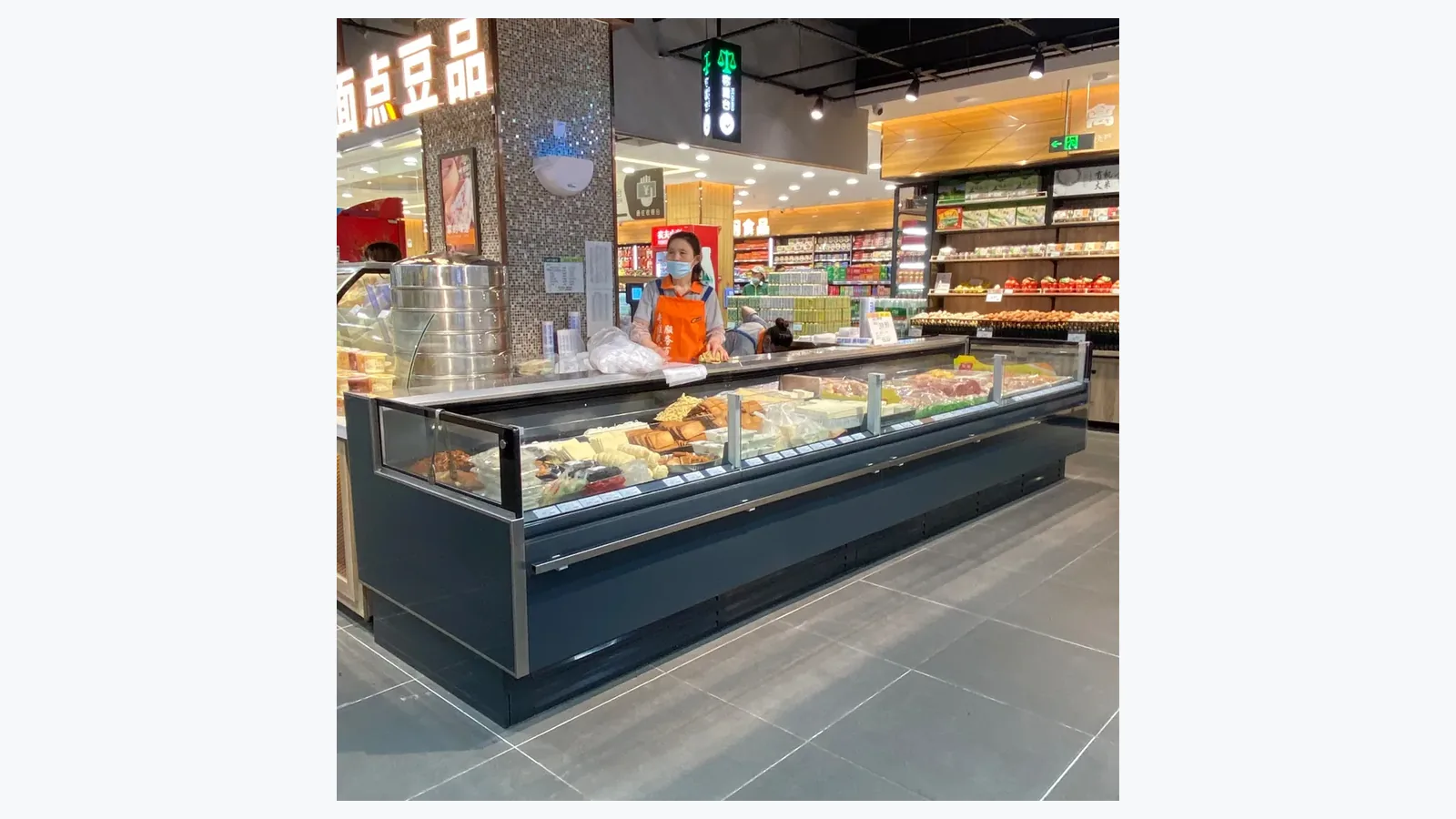
Confirm Product Identity Before Recording Moisture
Start with the product title, model documentation, installation type, and photographs of the complete counter. Record that the application is fresh meat and that the visible structure is a straight-glass service counter. The approved fresh meat showcase counter page is the correct entity reference.
This distinction matters because different cabinet structures have different openings, service access, air paths, glass assemblies, and loading practices. Advice for an open chiller or an island freezer cannot automatically be transferred to a fresh-meat service counter.
Photograph the customer side and rear service side from far enough away to show nearby doors, air outlets, windows, cooking areas, wash areas, and other refrigerated equipment. Include the full run when several cases are joined.
Map the Moisture Location Precisely
Divide the observation into zones instead of writing "glass condensation." Note whether moisture appears on the room-facing glass surface, product-facing surface, top edge, bottom edge, corner, frame, joint between sections, display deck, rear opening, base, or floor.
Use a simple numbered sketch or photo annotation. A wide photo shows the cabinet and surroundings; a close photo shows droplet size and exact location. Keep both. Wiping first removes useful evidence, so photograph the initial condition before routine cleaning when food-handling procedures permit.
| Observation Zone | Record This Detail | Why It Helps |
|---|---|---|
| Room-facing glass | Whole pane or local patch | Separates broad surface moisture from an edge issue |
| Product-facing glass | Height, side and nearby load | Connects the pattern with the display space |
| Frame or joint | Exact corner, seal line or section | Identifies a localized boundary for inspection |
| Rear service side | Opening, door position and work activity | Shows how staff access coincides with the event |
| Base or floor | First wet point and direction of spread | Prevents a floor puddle from being assumed to start at the glass |
Record When the Pattern Starts and Clears
Time is as important as location. Log the first appearance, peak condition, and when the glass clears. Compare opening hours, first loading, busy service periods, cleaning, nearby door use, and overnight operation.
A single photograph at the wettest moment proves the condition existed, but a short sequence shows whether it is continuous or tied to an event. Use the same camera position where possible. Record store time rather than relying only on a phone file name.
Include recent changes. A moved air outlet, a new entrance routine, a changed display load, a maintenance visit, or different cleaning schedule may be relevant. Report the change without claiming it caused the problem.
Compare Customer Side and Rear Service Activity
A service counter interacts with two work zones. Customers approach the display side while staff load, serve, clean, and open access points from the rear. Record activity on both sides during the moisture event.
For the rear side, note how often access is opened, whether an opening remains partially open, and whether trays or packages interfere with normal closure. For the customer side, note nearby entrance traffic, queues, direct airflow, and sunlight. The goal is an accurate operating picture, not a diagnosis made from one observation.
Keep service-side clearance visible in the photos. The commercial refrigeration service-access guide explains why blocked panels and crowded work areas can complicate inspection.
Log Loading Without Inventing a Universal Fill Line
Photograph the display before and after loading. Record product arrangement, package height, gaps, and any item touching glass, air openings, panels, or lights. Use the model manual and site procedure for allowed loading boundaries because one universal limit cannot be assumed for every counter.
Include the time and approximate stage of stocking: empty, partly loaded, newly filled, or after a sales period. If the pattern changes after loading, that relationship belongs in the record. It still requires qualified evaluation before a cause is assigned.
Food safety and handling procedures remain the priority. Protect exposed products according to the store's approved process while the cabinet condition is reviewed.
Capture Room and Airflow Context
Write down available room-condition readings from maintained site instruments, along with the instrument location and time. Avoid estimating humidity or temperature by feel. A reading near an entrance may differ from one at the counter.
Photograph nearby supply vents, fans, doors, open windows, cooking or washing activity, and temporary equipment. A lightweight tissue or improvised smoke test near a refrigerated display can create safety and contamination concerns; airflow checks belong with the appropriate technician and site procedure.
Outdoor weather may help explain the store context, but it cannot replace indoor readings. Log rainfall or unusually humid conditions as context only.
Separate Cleaning Water From Recurring Condensation
Record the most recent glass cleaning, floor cleaning, defrost-related work, and spill. Note the cleaning method and the exact time the surface was first seen wet again. Water that remains after cleaning can be mistaken for a recurring refrigeration issue, while repeated moisture can be dismissed as cleaning water when the timeline is missing.
Follow approved cleaning and food-handling methods. Avoid directing water into electrical, lighting, control, joint, or service areas. Preserve photographs of any first wet point around the base before the floor is spread by foot traffic or a mop.
Build a Technician-Ready Record
Combine product identity, full-counter photos, moisture-zone photos, time sequence, store events, loading state, rear-access activity, room readings, cleaning history, and any recent installation or service change. Add the contact person and times when the condition can usually be observed.
Use neutral language. "Moisture covers the lower room-facing third of the left straight-glass pane from 14:10 to 15:00" is more useful than "the counter insulation failed." Qualified inspection can then focus on a repeatable condition.
Related Reading
- Fresh Meat Display Counter Selection covers procurement and layout questions for this product application.
- Commercial Refrigeration Service Access helps keep panels and working areas reachable for inspection.
Common Questions
Is every wet glass surface a cabinet fault?
No single conclusion follows from the appearance alone. Surface, location, timing, room conditions, loading, openings, cleaning, installation, and cabinet condition all need review.
May staff wipe the glass before service arrives?
Food safety and store operation come first. Photograph the initial pattern when practical, note the cleaning time, and record whether the moisture returns.
When does moisture require urgent escalation?
Escalate promptly when the condition affects food handling, creates a slip or electrical concern, involves damaged glass, or falls under the site's urgent-service criteria.
Share the Exact Moisture Pattern
Use the XCCOLD contact page to send the model, counter structure, installation context, wide and close photographs, timing, loading state, room readings, cleaning history, and rear-service activity. A mapped pattern helps the right people prepare for the next inspection.