
Frost in a commercial island freezer is more useful as evidence when the store records exactly where it appears, how quickly it returns, and what was happening around the cabinet. A general note that an island is "icing up" cannot distinguish a localized edge pattern from broad accumulation, product contact, a lid-use issue, or a condition that needs technical inspection.
This guide focuses on an XCCOLD low horizontal commercial island freezer with sliding glass lids and a frozen-food application. It does not cover open multidecks, upright glass-door freezers, beverage coolers, or open-top chest freezers.
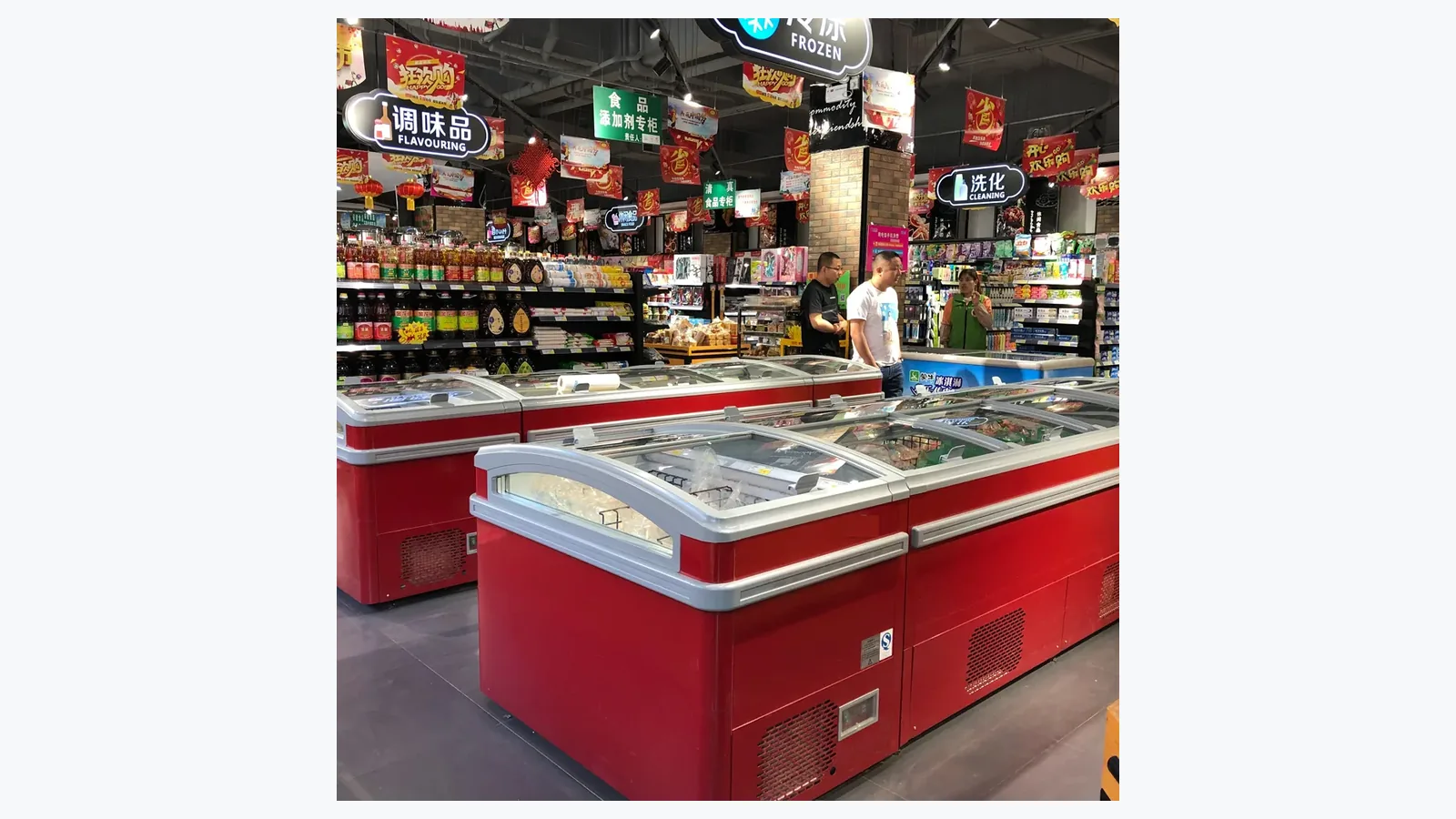
Lock the Island-Freezer Structure First
Record the product title, model, cabinet run, and installation type from the actual order and site documents. Photograph the whole island from both ends and both long sides. Include the sliding glass lids, end sections, nearby aisles, floor, and connection or service context visible without removing panels.
The approved commercial island freezer page establishes the correct product identity. A flat horizontal covered island has different user contact and opening patterns from an upright or open case, so troubleshooting notes need to remain structure-specific.
When several modules form one run, assign each section a simple location code. For example, face the aisle from one fixed end and label sections A, B, C, and D. Use the same direction in every photograph and service message.
Map Frost by Surface and Section
Record whether frost appears on the product-facing side of a glass lid, cabinet rim, divider, internal wall, basket, package, drain area, one end section, or several connected sections. Note thickness descriptively without presenting an estimate as a measurement.
Photograph a wide view first, then a close view with the section label visible. If the frost forms a line, corner patch, broad film, or mound around one package, state that pattern. Avoid scraping the location clean before the initial record when store safety and product procedures allow.
| Frost Location | Useful Context | Common Recording Error |
|---|---|---|
| Sliding glass lid | Inside or outside surface, panel position | Photographing only the droplets with no cabinet view |
| Rim or lid track | Section, corner and nearby obstruction | Calling every white deposit a seal failure |
| Internal wall | Height and side of the section | Omitting the loading level |
| Basket or package | Product position and contact point | Moving stock before the first photo |
| One end of the run | End panel, aisle and nearby equipment | Treating a local pattern as cabinet-wide |
Add a Time Sequence
Write down when the area was last clear, when frost was first noticed, and when it became operationally significant. If an approved defrost or cleaning procedure was completed, note the start, finish, and time the pattern returned.
Use photographs from the same angle at consistent intervals. The record may show gradual accumulation, a pattern tied to peak shopping hours, or a condition that reappears after restocking. It provides a timeline for review without assigning a cause prematurely.
Include power interruptions, maintenance, relocation, seasonal store changes, or construction work if they occurred. State the event and time rather than assuming a direct link.
Observe Sliding-Lid Use
Check whether each glass panel slides through its normal travel and returns to the expected closed position. Record damaged handles, track obstructions, packaging caught at an edge, or panels left open during customer selection and stocking.
Avoid forcing a stiff or misaligned panel. A damaged glass component, frame, or track needs an appropriate safety response. Photograph the complete lid arrangement before moving loose items.
Count observations during a defined sample period rather than claiming the cabinet is "always open." Note whether the period covered restocking, normal shopping, or a busy promotion. This creates usable context for operating review.
Record Loading and Package Contact
Photograph the section before and after routine stocking. Note product height, basket or divider use, package contact with internal surfaces, and blocked areas visible to staff. Follow the model manual and store procedure for load limits; a generic online fill line is not a substitute for model documentation.
Frozen packages can change shape, tear, or release loose ice. Distinguish loose product ice from frost attached to a cabinet surface. Record damaged cartons, spilled ice, and packages frozen together as separate observations.
Protect frozen goods according to the store's food-safety and temperature-control plan while the cabinet is cleaned or inspected. This article does not set product disposition rules.
Capture Store Conditions Around the Island
Photograph entrance doors, air outlets, direct sunlight, floor cleaning areas, nearby heated equipment, and the aisle around the affected section. Record available room-condition readings from maintained instruments, including location and time.
The island freezer trolley-access planning helps review whether shoppers and stock carts can approach the lids without creating avoidable congestion. Layout cannot diagnose frost, but it can explain the operating environment shown in the log.
Also record whether floor water, roof leaks, wash activity, or temporary humidification is present. Keep observations factual and leave technical cause assessment to qualified personnel.
Connect Cleaning Records With the Observation
Use the approved equipment procedure for frost removal and cleaning. Sharp tools, uncontrolled heat, and water directed into electrical or service areas can damage the cabinet or create hazards. If the approved method is unclear, pause and obtain the correct documentation.
Record which section was cleaned, who completed the work, the method, start and finish time, product handling, and any unusual condition. The refrigerated display case cleaning access plan provides a broader way to keep cabinet records consistent.
After cleaning, take a clear baseline photograph. That image gives later photos a reliable starting point.
Escalate With a Complete Service File
Combine model and unit identity, installation type, section map, wide and close photographs, recurrence timeline, sliding-lid observations, loading state, store conditions, cleaning history, and recent changes. Mention any damaged glass, electrical concern, water on the floor, unusual sound, odor, or inability to keep the product area within the site's approved operating process.
Avoid opening service panels or adjusting controls outside authorized procedures. A complete observation file helps a technician prepare without encouraging store staff to diagnose refrigeration components.
Related Reading
- island freezer trolley-access planning covers shopper flow, lid access, and store positioning.
- refrigerated display case cleaning access plan helps align cleaning events with the frost timeline.
Common Questions
Can staff remove frost immediately?
Follow the equipment manual, food-safety plan, and approved store procedure. Capture the initial location and pattern first when it is safe and practical.
Does frost on one package prove a cabinet problem?
No. Record package condition, contact points, surrounding surfaces, section, and timing so the observation can be evaluated in context.
Which signs deserve urgent service attention?
Use the site's escalation rules for damaged glass, unsafe lids, water hazards, electrical concerns, unusual operating signs, or conditions affecting frozen-product control.
Send the Frost Map With the Model
Use the XCCOLD contact page to share the model, island-run layout, installation context, affected section, frost location, photos, lid-use notes, loading state, cleaning timeline, and recent store changes. Clear structure and chronology make the request more actionable.